Prana · E-Commerce · 2024–2025
E-commerce for park homes,
built on trust.
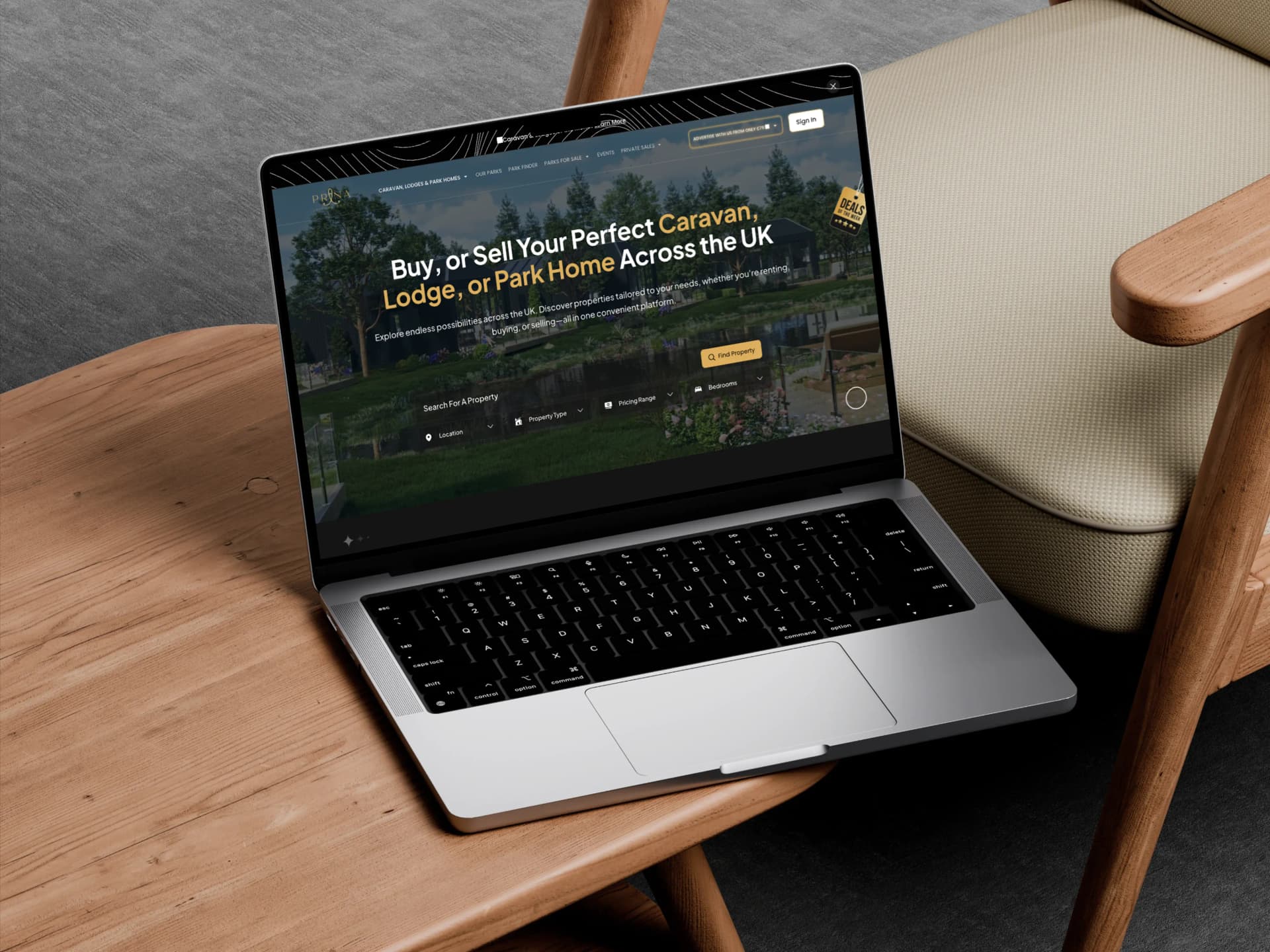
What is Prana?
Prana Leisure Group is a UK property platform for buying, renting, and selling caravans, lodges, and park homes — a high-consideration market where trust is the product.
Client
Prana Leisure Group
My Role
Product Designer + Client Lead
Platform
Web + Mobile
Delivered
Feb 2025 · Phase 1
I owned end-to-end design across three systems — the public buyer-facing platform, a self-serve Property Management System for owners, and a Superadmin dashboard for Prana's internal team — while managing the UK client relationship and developer handoff simultaneously.
Designer, Bridge, and Project Lead
This project required more than design skills. It required managing a three-way relationship — client, designer, developer — across time zones, disciplines, and very different definitions of "done".
UX/UI Design Lead
End-to-end ownership across all three systems — research, information architecture, wireframes, and full hi-fi UI. Mobile-first approach on every screen, scaled to desktop. Component-based Figma system built for clean developer handoff.
Client Communication (UK)
Regular structured syncs with the UK-based client across time zones. Async Loom walkthroughs for design reviews between calls. Written decision logs so every direction was documented, traceable, and never lost between conversations.
Developer Liaison
Managed the full handoff from Figma to build. Stayed actively involved through the development phase — reviewing implementations, flagging deviations early, and translating design decisions into language the developer could act on immediately.
Project Coordination
Served as the single point of coordination across client, design, and development for the entire 6-month engagement. Kept milestones clear, proactively flagged scope risks, and ensured both sides were always working from the same shared understanding.
Understanding the Buyer Before Designing for Them
No design decision was made without first understanding who was making the purchase, what they needed to feel confident, and where existing platforms were leaving them stranded.
Who is the Buyer?
The park home and leisure property market skews toward buyers in their 50s and 60s — often people making a major lifestyle transition, downsizing, or planning retirement. Many are less digitally confident than a younger demographic. They value credibility, plain information, and a sense that the platform is on their side — not trying to push them toward a decision before they're ready.
Understanding this user profile fundamentally shaped the tone and hierarchy of every screen. The design language needed to feel calm and authoritative, not flashy or pressurised.
Competitor Analysis
Reviewed leading UK property platforms — Rightmove, Zoopla — and niche park home specialists. Key findings: most platforms in this category were either too generic (the big portals, not optimised for park homes) or too dated (the specialists, built years ago with no clear UX thinking). None of them answered the real questions a buyer has before they enquire. Information hierarchies were flat, filter systems were clunky, and the mobile experience was consistently broken or afterthought.
Mental Model Mapping
I mapped the emotional journey of a first-time park home buyer through five stages: initial curiosity → location research → lifestyle fit check → price confidence → finally, the enquiry. Each stage carries different anxieties and information needs. The design had to meet buyers at whichever stage they arrived, not force them toward conversion before they were ready.
Buyers don't abandon because the product is wrong — they abandon because they don't feel informed enough to take the next step. The job of the design is to reduce uncertainty, not just display listings.
Key Insights That Shaped the Design
- Trust signals must be structural, not cosmetic — badges and ratings dropped onto a page don't build confidence. The layout itself has to communicate reliability through clarity, consistency, and honest information.
- Price transparency is non-negotiable — hiding or obscuring pricing until the enquiry stage is the single fastest way to lose a high-consideration buyer. Prices had to be visible and clear from the listing card onwards.
- Location is the primary filter — park home buyers are choosing a place to live, not just a property. Geographic browsing needed to be a first-class feature, not an option buried in the filter panel.
- Many buyers don't know what they want yet — a significant portion of users arrive with a vague lifestyle aspiration, not a specific property type in mind. This insight directly led to the Park Finder guided discovery tool.
- Mobile matters more than expected — initial research and casual browsing happens overwhelmingly on mobile. The desktop is where buyers go deep; the phone is where they first arrive. Mobile-first was not optional.
Structuring Three Systems, One Coherent Product
The IA challenge here was not just organising one website — it was designing three separate systems that each served a completely different user type, while maintaining a coherent product identity across all of them.
Public Platform — Buyer Journey
Designed to match the buyer's mental model, not Prana's internal categories. Five primary sections — Caravans/Lodges/Park Homes, Our Parks, Park Finder, Parks For Sale, Events.
Property Management System
Deliberately simple sidebar with seven clearly labelled sections for owners: Dashboard, Manage Park, Manage Listings, Leads, Customer, Manage Events, Media Download. No jargon, no nested layers.
Superadmin Dashboard
Designed for efficiency for the internal team. Six sections give complete visibility: Dashboard, Property Owner, All Park, All Listings, Events, Media Download.
The Buyer Experience
Five core screens make up the public platform — each one a deliberate answer to a specific buyer anxiety. Dark premium aesthetic, gold accents, and a type system that guides without competing. Every screen was filtered through the same question: does this make the user feel more confident?
Interface Demo — A high-level walkthrough of the Prana buyer experience, from initial discovery to property detail. Phase 1 launched with full mobile-first responsiveness across all core flows.
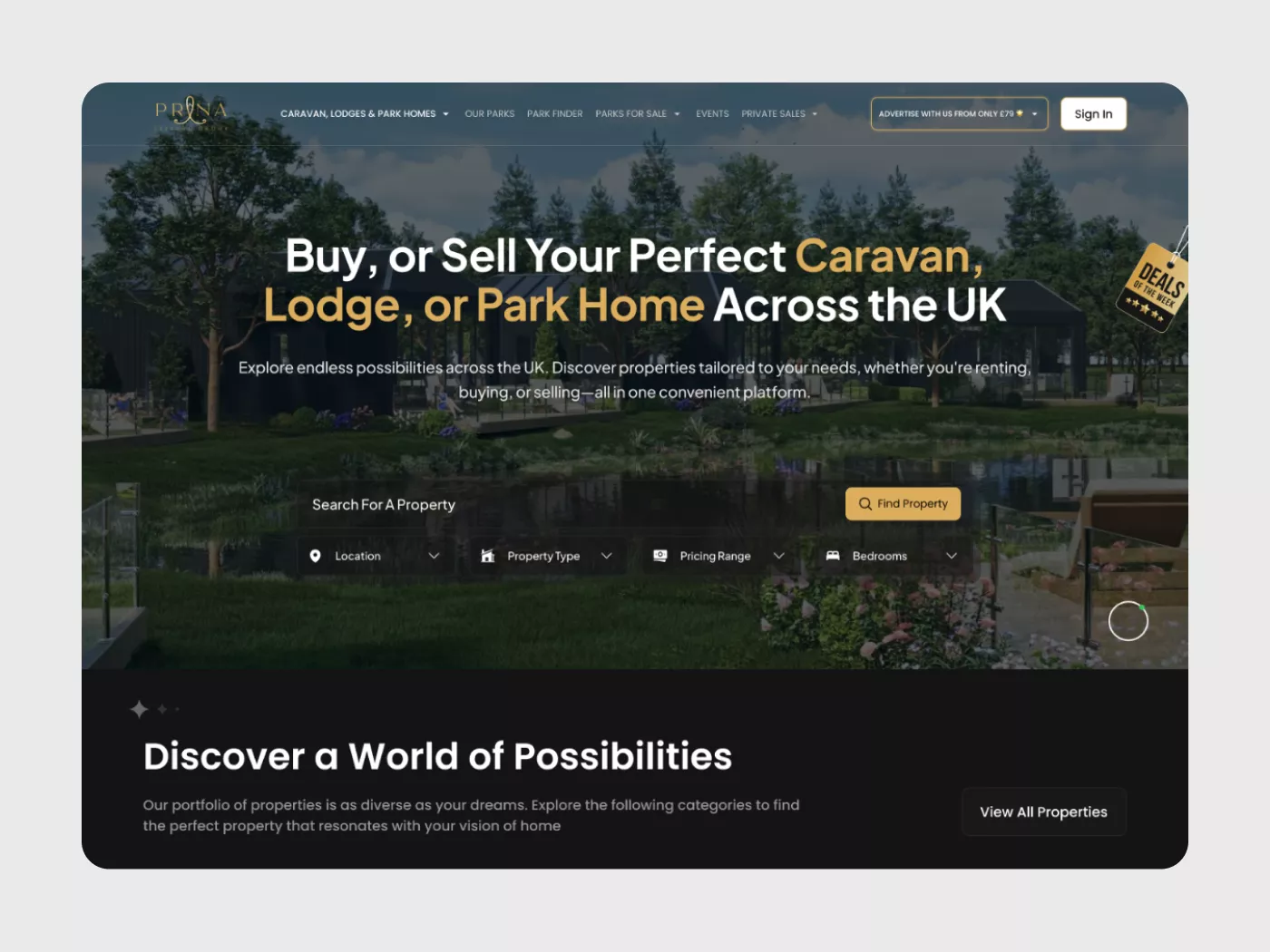
Fig. 01: Homepage — Landing & Discovery
Landing page — full-bleed hero photography, direct value proposition, persistent search bar with filters, announcement bar, and primary navigation covering the full product breadth
The homepage had one job above everything else: establish credibility before the user scrolls. The hero leads with the buyer's intent — Buy, or Sell Your Perfect Caravan, Lodge, or Park Home Across the UK — not the brand's identity. The search bar is positioned immediately below the hero with four filters visible above the fold: Location, Property Type, Pricing Range, and Bedrooms. A buyer can begin filtering within seconds of arriving.
The announcement bar at the top surfaces the advertiser offer — a secondary revenue stream that also functions as a trust signal. The navigation covers the full product breadth without being cluttered: Caravans/Lodges/Park Homes, Our Parks, Park Finder, Parks For Sale, Events, and Private Sales. The "Discover a World of Possibilities" section below the fold leads buyers into category browsing with zero friction.
- Search bar above the fold — the primary conversion point is never hidden or reached only after scrolling.
- Value proposition in buyer language — not the brand's category names, but what the buyer actually wants to do.
- Deals of the Week badge — creates urgency without feeling manipulative; buyers in this category respond to curated selections, not countdown timers.
- Sign In prominent but not dominant — respects that most buyers are browsing anonymously at this stage.
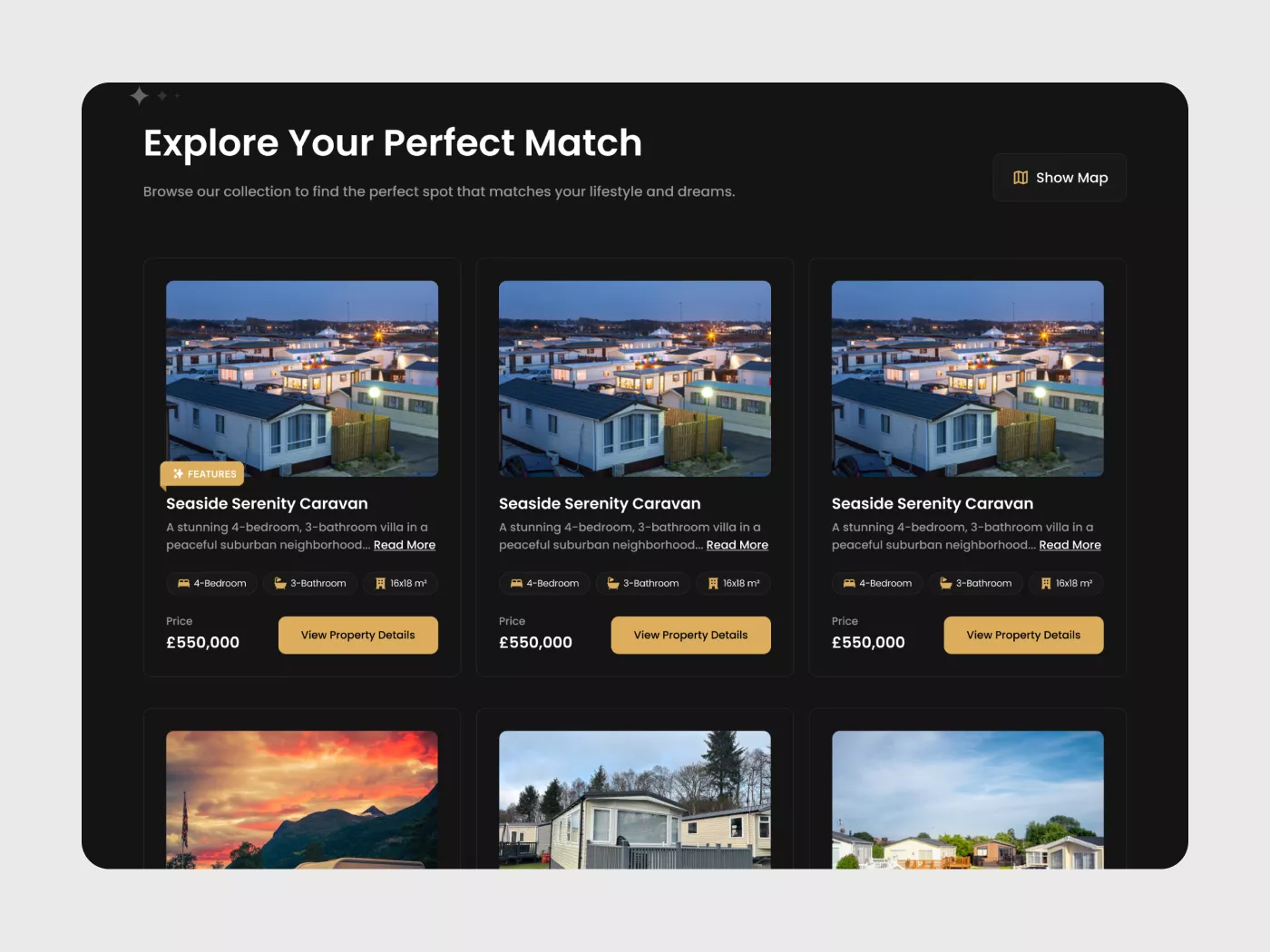
Fig. 02: Property Listings — Grid View
Listings grid — persistent filter bar at top, three-column property cards with photo, specs, price, and CTA. "Show Map" toggle always accessible top right
The listing grid was designed around the concept of efficient triage. A buyer arriving at the listings page has signalled intent — they know broadly what they want, and now they need to evaluate quickly. Each property card contains precisely what's needed for that triage: a photograph, the property name, a one-line description, key specifications (bedrooms, bathrooms, floor area), and the price. The CTA ("Read More") is clear and low-commitment — it doesn't say "Enquire Now" at this stage, because the buyer isn't there yet.
The filter bar persists at the very top of the page — Location, Property Type, Pricing Range, Bedrooms, and an Advanced Filter expand option. The "Show Map" button sits top right, always one click from geographic browsing mode. The "FEATURES" badge on select cards signals curated or promoted listings without breaking the grid's visual rhythm.
- Filter persistence — filters stay visible as the buyer scrolls; refining a search should never require scrolling back to the top.
- Price always visible on cards — never hidden behind a click; high-consideration buyers will not click into a listing whose price they can't see.
- Three columns on desktop — enough visual variety to engage without overwhelming; collapses to single column on mobile.
- Map toggle always accessible — geographic browsing is a primary mode for this category, not a buried option.
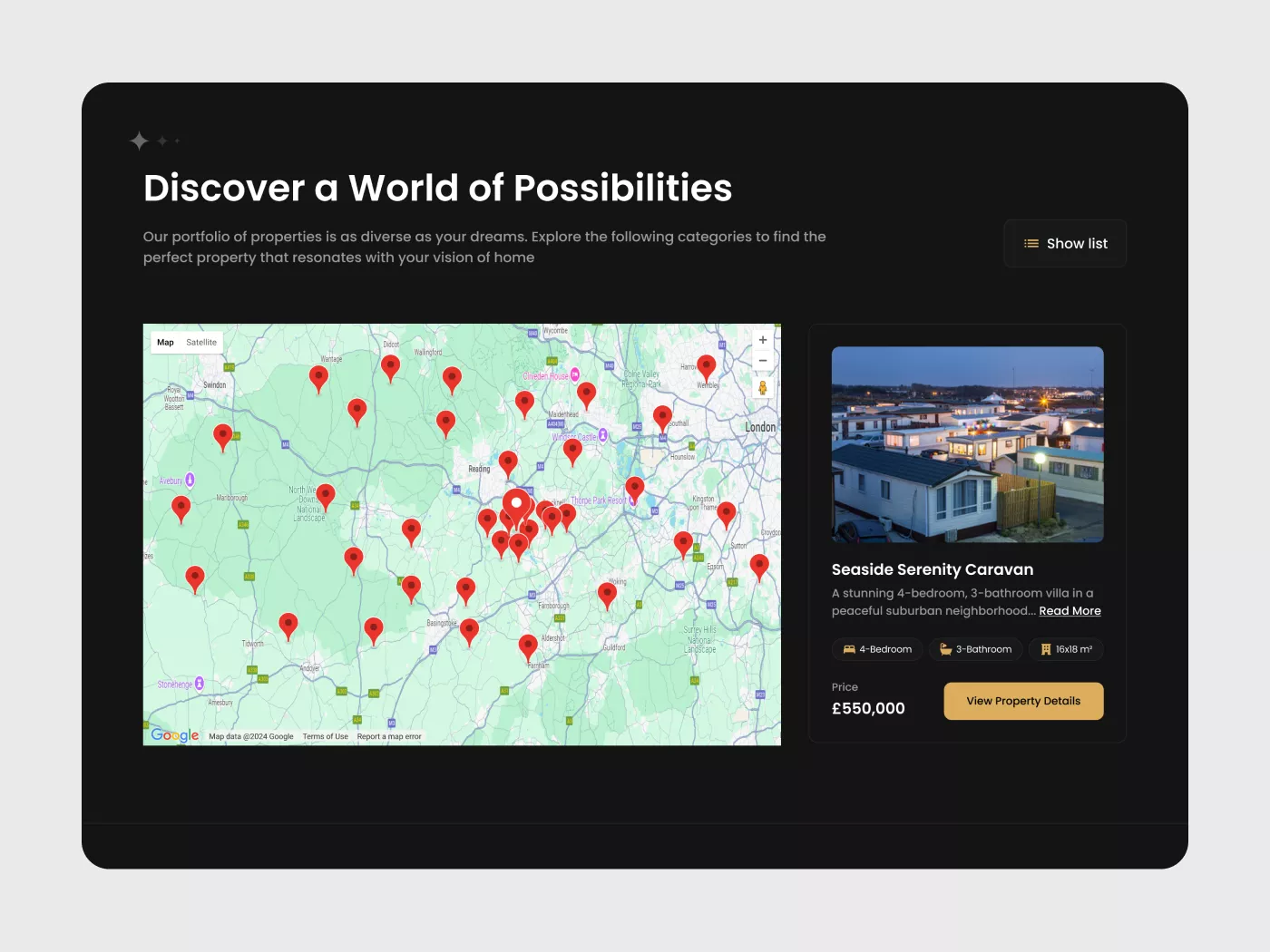
Fig. 03: Property Listings — Map View
Map view — full interactive Google Maps panel with all listings pinned. Clicking any pin instantly loads the property preview card on the right with photo, specs, price, and a direct CTA to view full details
For buyers in the park home category, location is often the most important filter of all. A buyer choosing a park home is choosing where they will live — proximity to family, coastline, countryside, or a specific region of the UK is frequently the deciding factor before any property specifications are even considered. The map view was built as a first-class experience to serve this directly.
The layout is a dual-pane design: the interactive Google Maps panel fills the left, showing all available listings as location pins across the UK. The right panel displays a live property preview card that updates instantly when a pin is selected — no page reload, no loss of context. The preview card contains the property photo, a one-line description, bedroom/bathroom/size specs, price, and a "View Property Details" CTA. The "Show list" toggle at the top right allows an instant switch back to grid mode.
- Instant pin-to-card preview — selecting a pin requires no commitment; buyers can scan multiple properties rapidly without loading new pages.
- Price visible in the preview card — consistent with the listing cards; pricing is never hidden in any context.
- "Discover a World of Possibilities" header — the section copy above the map is aspirational without being misleading; it reflects the geographic breadth of the portfolio.
- Satellite/Map toggle on the map itself — useful for buyers evaluating natural surroundings, coastal proximity, or rural setting.
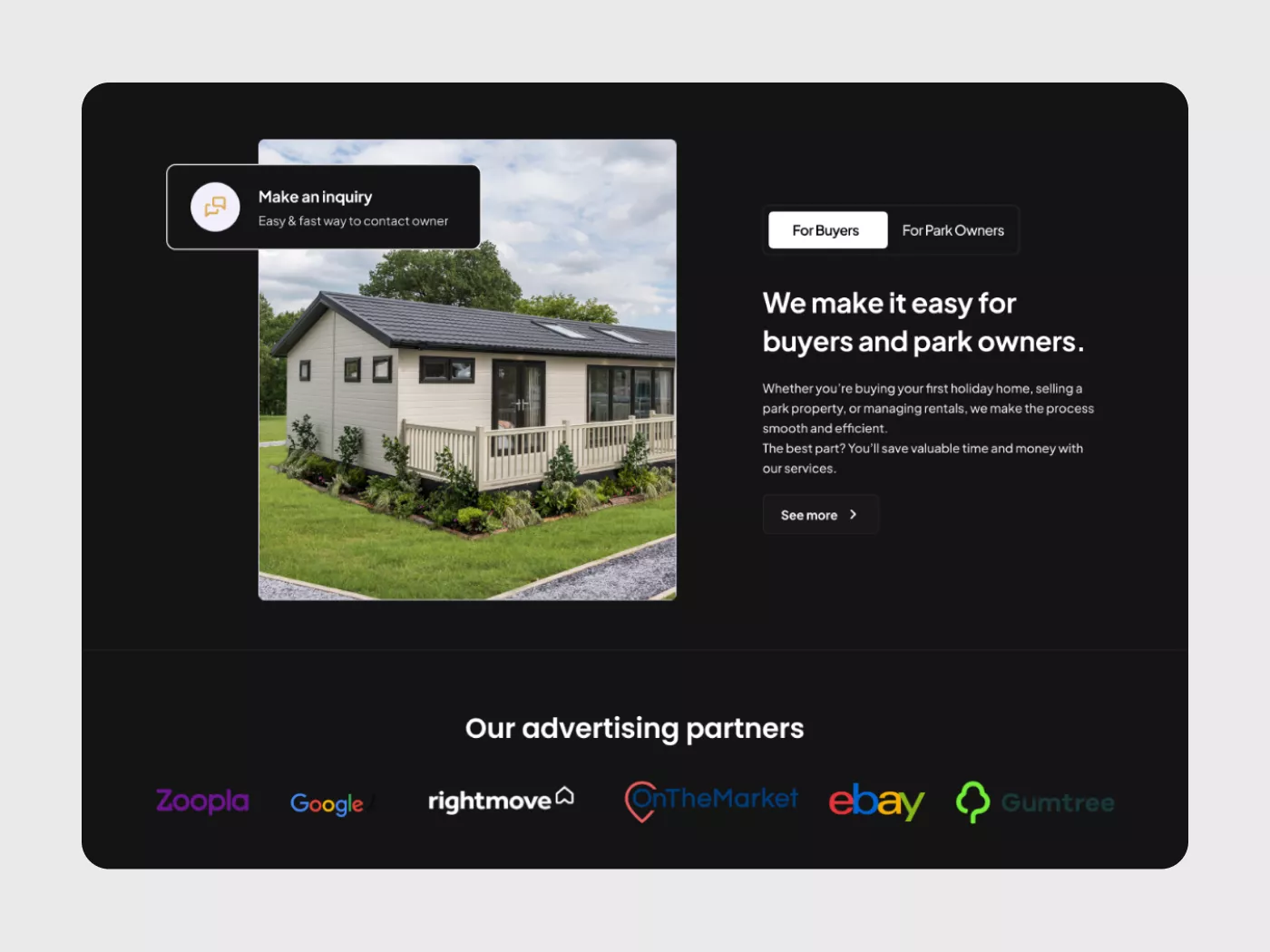
Fig. 04: Park Finder — Guided Discovery Tool
Park Finder — step-by-step preference tool: price range at top, visual park type selection with real photography, preferred ownership type (Buy/Rent/Lease-to-Own), and a detailed lifestyle wishlist chip system
The Park Finder was one of the most carefully considered features on the platform. It emerged directly from the research insight that a significant portion of buyers arrive at Prana without a specific property type in mind — they have a lifestyle aspiration rather than a clear brief. They know they want to simplify, downsize, or live somewhere beautiful. They don't yet know whether they want a holiday park, a residential park, a touring site, or a mixed-use development.
The Park Finder is a structured preference wizard that walks buyers through their requirements question by question. It starts with budget range — price bands from £0–£50k through to £200k+ — before moving to park type selection. Critically, park type uses real photography for each category rather than text labels alone. A buyer can see what a "Touring/Glamping Park" actually looks like, what a "Residential Park" feels like, before selecting. The ownership type section (Buy / Rent / Lease-to-Own) surfaces a pivotal decision point early in the process. The wishlist chip system is extensive — covering everything from Gated Development and Over 55s Community to Pet-Friendly Policy and Investment Potential — allowing buyers to express nuanced lifestyle preferences in plain, scannable language.
- Photography-led park type selection — reduces cognitive load for buyers who find abstract category names ambiguous.
- Ownership type surfaced early — Buy vs Rent vs Lease-to-Own is a foundational filter that should shape all subsequent results; asking it early prevents mismatched outcomes.
- Wishlist chips, not dropdowns — chip-based selection allows buyers to add multiple lifestyle preferences simultaneously without navigating multi-select dropdowns; faster and more expressive.
- Progressive form structure — one clear question section at a time prevents the overwhelming "wall of filters" experience common on competing platforms.
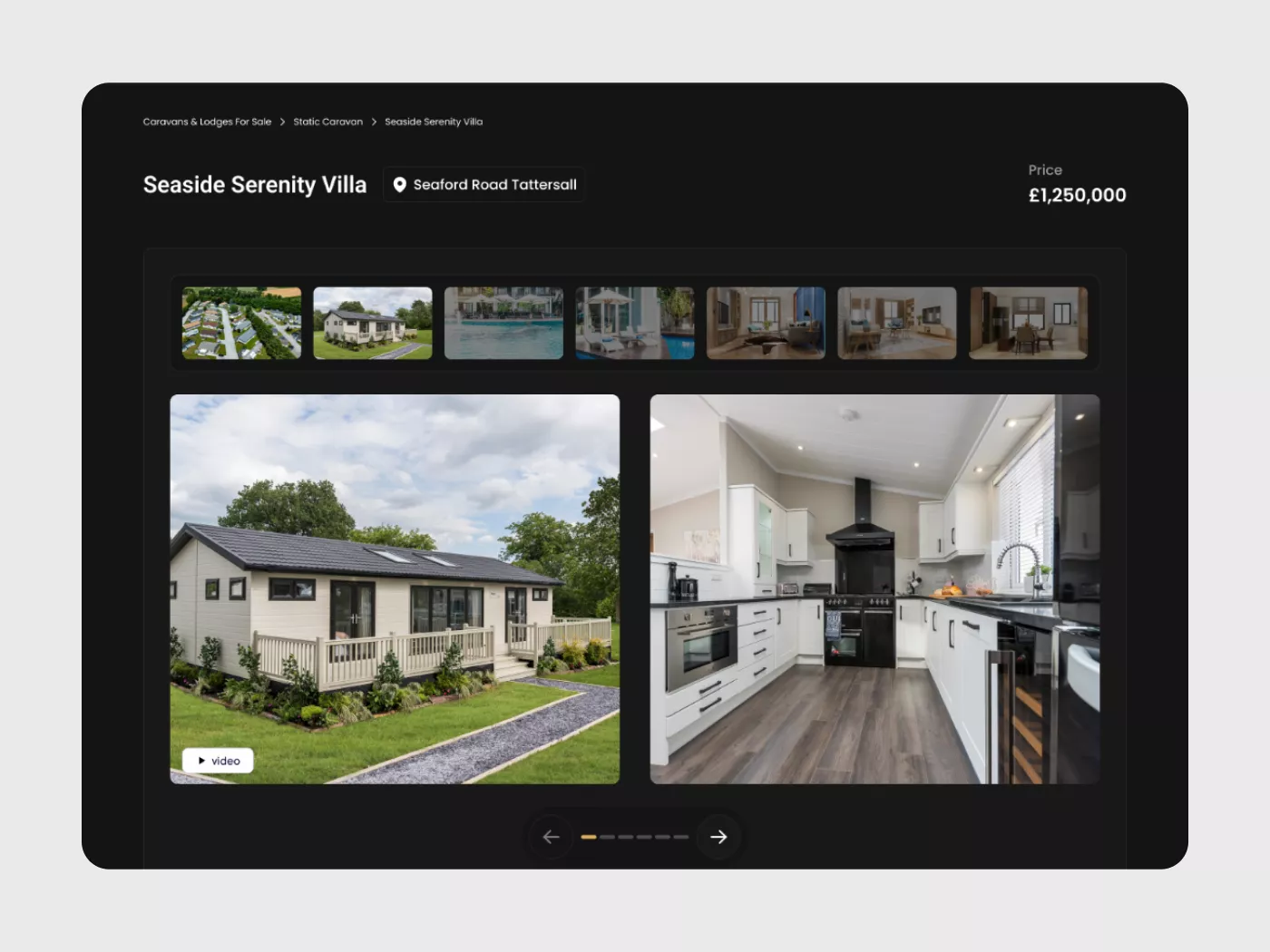
Fig. 05: Property Detail Page
Property detail — breadcrumb orientation, name + location + price immediately visible, thumbnail gallery strip with 7 images, dual-panel main gallery (exterior and interior), and video badge on the primary image
The property detail page is the most critical screen in the entire buyer journey. It's where a buyer either gains the confidence to enquire — or leaves. The information order was the central design challenge here, and it was treated as a deliberate sequence rather than a collection of modules.
The page opens with breadcrumb navigation: Caravans & Lodges For Sale → Static Caravan → Property Name. This gives the buyer immediate orientation — they know where they are, how they got here, and how to get back. The property name and location address are displayed side-by-side in large, confident type. The price — £1,250,000 — sits at the top right: large, unambiguous, and impossible to miss. There is no moment where a buyer wonders what this property costs.
Below the heading, a thumbnail gallery strip shows all available images at a glance — seven or more in Phase 1. This immediately signals a complete, transparent listing with nothing hidden. The main gallery below uses a dual-panel layout: exterior view on the left, interior (kitchen in this case) on the right. This gives buyers an instant inside/outside reading of the property without requiring any interaction. A "video" badge on the main exterior image signals that richer media is available for buyers who want to go deeper.
- Breadcrumbs always present — buyers arriving from map pins, external links, or search can orient themselves immediately without pressing back.
- Price at top right, never below the fold — the single most important piece of information for a high-consideration buyer must be the most findable thing on the page.
- Thumbnail strip signals completeness — seven visible thumbnails communicates "we have nothing to hide about this property" before the buyer has scrolled at all.
- Dual-panel gallery removes the first click — exterior and interior visible simultaneously; the buyer gets a complete first impression passively.
- Video badge, not video autoplay — respects the buyer's attention; signals richness without forcing it.
The Systems Behind the Platform
The public-facing website is only one third of what was designed and built. Behind it sit two operational systems that make the platform function: a self-serve portal for property owners, and a full administrative command centre for Prana's internal team. Both systems share the same design language as the public platform — dark, gold, precise — but are optimised entirely for task efficiency rather than buyer persuasion.
Designing these backend systems required a different mode of thinking. The public platform asks: how do we build confidence in a hesitant buyer? The PMS and admin ask: how do we help an operator or administrator complete a specific task as quickly and clearly as possible? The answers look different even when the visual language is the same.
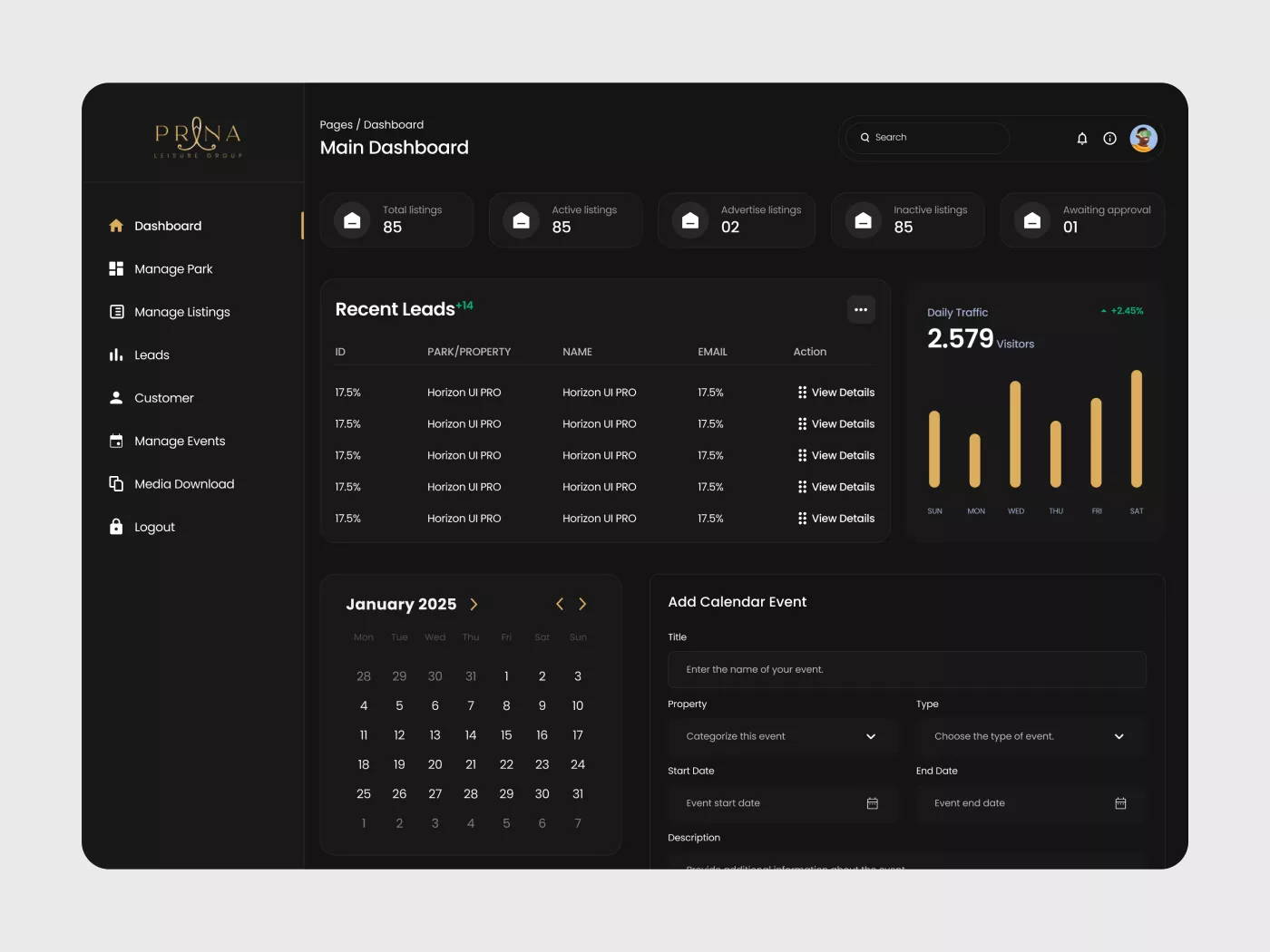
Fig. 06: Owner Dashboard — Main Overview
Property owner main dashboard — five KPI stat cards at top (Total, Active, Advertise, Inactive listings + Awaiting approval), recent leads table with quick actions, weekly traffic chart (2,579 visitors, +2.45%), calendar view for January 2025, and inline event creation form with image upload
The owner dashboard was designed to give a property operator their complete operational picture in a single view. A property owner managing multiple listings across one or more parks needs to know, at a glance: how many listings are live, how many leads have come in recently, how their traffic is trending, and what's coming up on the calendar. All of that is answered before they scroll.
The five KPI cards at the top — Total Listings (85), Active Listings (85), Advertise Listings (02), Inactive Listings (85), Awaiting Approval (01) — give the owner an immediate operational status check. The "Awaiting Approval" card is particularly important: it signals that something requires action without requiring the owner to hunt through their listings to find out what.
Below the KPI row, the dashboard is divided into three zones. Left: the Recent Leads table, showing the five most recent buyer enquiries with park/property name, buyer name, email, and a quick "View Details" action. Right: the Daily Traffic chart — a seven-day bar chart showing visitor volume (2,579 that week, +2.45% trend). This gives operators visibility into how their listings are performing without requiring them to navigate to a separate analytics section. Below both of these: a monthly calendar view (January 2025) paired with an inline event creation form — title, property association, event type, date range, description, and image upload all in one panel.
- Everything critical above the fold — an owner can assess their entire operational situation — listings status, recent leads, traffic trend — without scrolling.
- "Awaiting Approval" as an action prompt — this card is not purely informational; it's a direct pointer to something that needs the owner's attention.
- Traffic chart on the main dashboard — owners care about whether their listings are being seen; making this a top-level metric reduces the need for separate analytics visits.
- Inline event creation — placing the event form directly on the dashboard reduces friction for an operator who wants to add a park open day or viewing event quickly.
- Left sidebar navigation — Dashboard, Manage Park, Manage Listings, Leads, Customer, Manage Events, Media Download — covers all owner needs in seven clearly named items with no nesting.
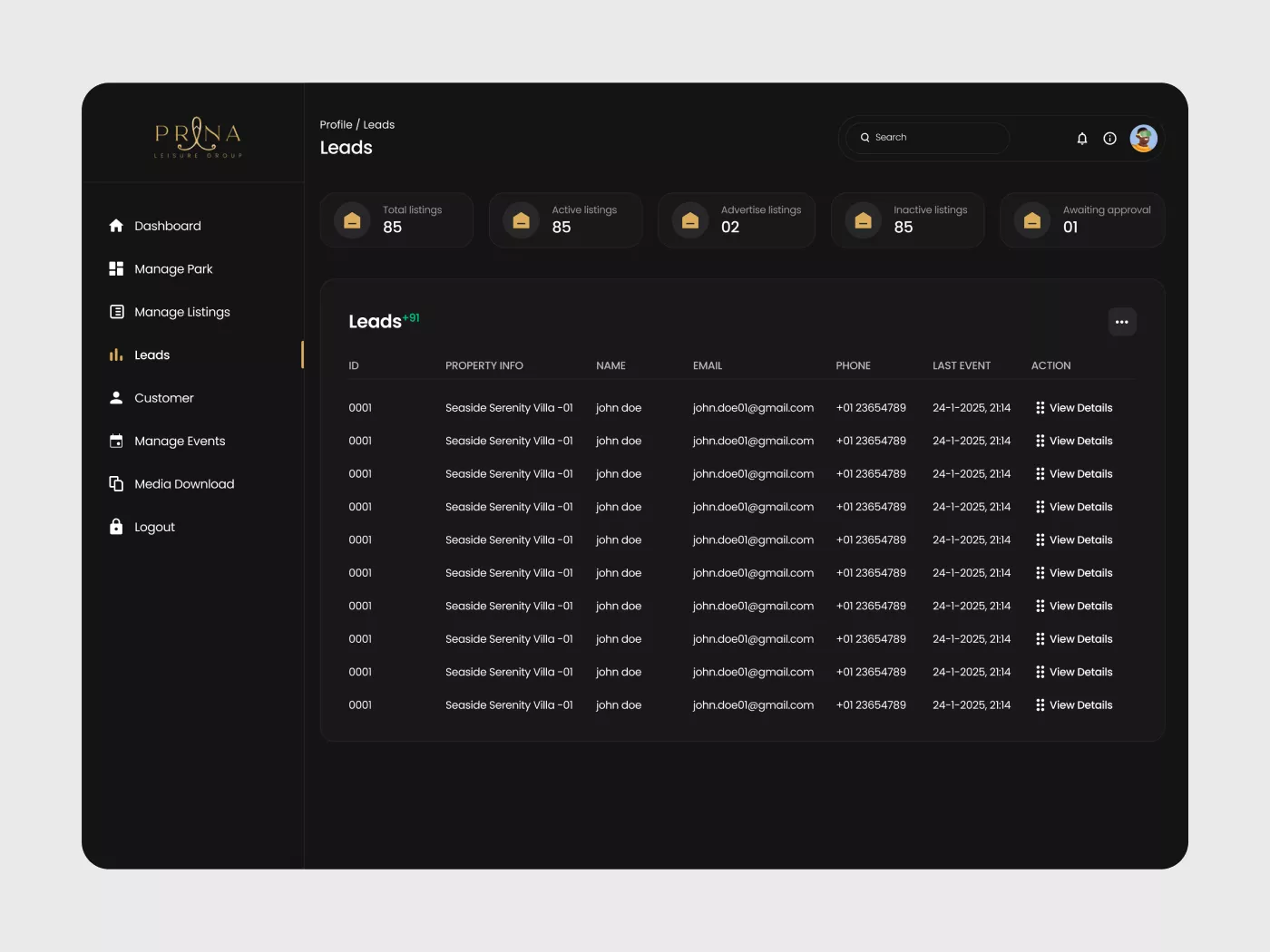
Fig. 07: Leads Management
Leads page — same five KPI stat cards carried from dashboard for continuity, full leads table with columns for ID, Property Info, Name, Email, Phone, Last Event timestamp, and "View Details" action. "Leads +91" counter indicates 91 new leads since last review
The Leads page is where a property owner manages every buyer enquiry that has come through the platform. This screen needed to be a functional working tool — not a report — because an owner with 91 unreviewed leads needs to move through them efficiently, identify the most recent or most promising contacts, and take action.
The page opens with the same five KPI cards carried from the dashboard. This was a deliberate continuity decision: wherever an owner is in the system, their key operational metrics are always visible at the top. Below the KPI row, the "Leads +91" heading communicates immediately that there are 91 new leads since the last review — a clear call to action before the table even registers.
The leads table presents six columns: ID, Property Info (which specific property the enquiry is about), Name, Email, Phone, Last Event (timestamp of the most recent interaction with this lead), and Action ("View Details"). The table is designed for scanning, not reading — all critical fields are visible at once, and "View Details" is always one click away. The search bar at the top right allows an owner to find a specific lead by name, email, or property without scrolling through the full table.
- Leads counter on the page title — "+91" immediately communicates the volume of unreviewed leads; an owner knows their workload before reading a single row.
- Last Event timestamp — shows when the most recent interaction with each lead occurred, allowing owners to prioritise follow-ups by recency.
- Property Info column — essential for owners managing multiple listings; a lead means nothing without knowing which property it relates to.
- KPI cards persist across pages — an owner switching from Dashboard to Leads never loses sight of their overall listing status.
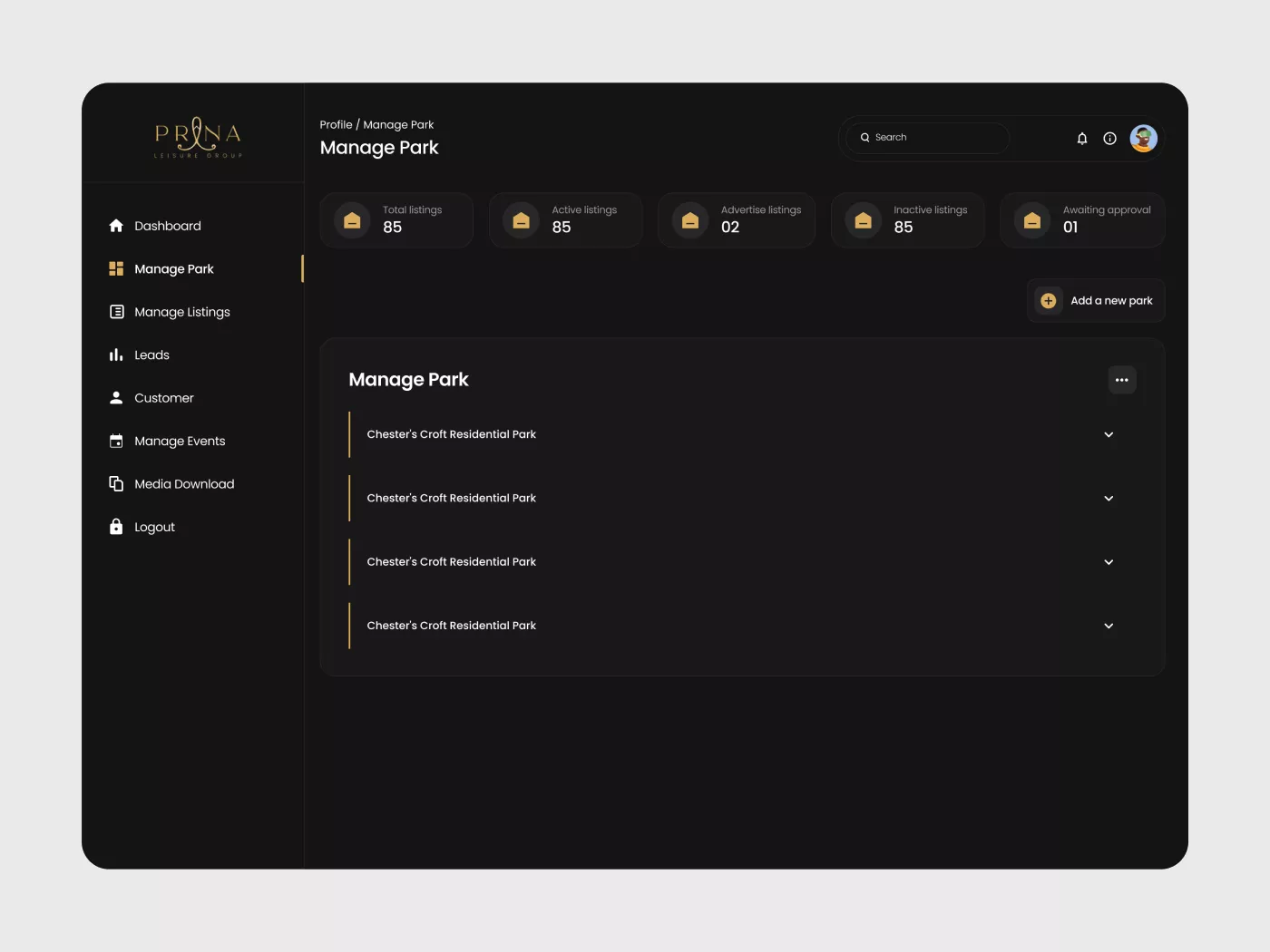
Fig. 08: Superadmin — All Parks
Superadmin All Park view — four platform-wide KPI cards (8,500 total listings, 1,500 active, 180 advertised, 85 awaiting approval), full parks table with Property Owner, Park Name, Property Type, Status, View Properties action, Preview link, and Approval toggle. Navigation shows admin-specific sidebar: Property Owner, All Park, All Listings, Events, Media Download
The Superadmin dashboard is a completely separate system from the owner PMS — different navigation, different data scope, different permissions. Where the owner sees their own listings and leads, the superadmin sees the entire platform. The navigation reflects this: Property Owner, All Park, All Listings, Events, Media Download — six items covering total platform oversight.
The All Parks page gives the admin team a complete view of every park registered on the platform, regardless of owner. The four KPI cards at the top reflect platform-wide scale: 8,500 total listings, 1,500 active, 180 advertised, 85 awaiting approval. The "Awaiting Approval" figure is the most operationally critical — 85 parks are pending review before they can go live on the public platform.
The parks table presents the information an admin needs to act: Property Owner, Park Name, Property Type, Status (ACTIVE badge), a "View Properties" quick action, a "Preview" link to see the live listing, and an Approval toggle (red/orange toggle switch) in the final column. The approval toggle is the most important UI decision on this screen — it gives the admin team the ability to activate or deactivate any park instantly, directly from the table row, without navigating into a detail page.
- Platform-wide KPI cards — the admin team's top-level metrics are categorically different from an owner's; the same card structure carries different data to serve a different operational role.
- Approval toggle in the table row — the most frequent admin action (approving or pausing a listing) is achievable without leaving the table view; this eliminates an entire navigation step from a high-frequency workflow.
- Preview link per park — admins can view the public-facing listing before or after approval to verify content quality without switching context.
- Search within the table — with 8,500 total listings, table-level search is essential; the admin cannot scroll to find a specific park.
- Different sidebar from PMS — admin navigation and owner navigation are separate systems with separate access levels; the visual similarity of the sidebar masks a completely different permission layer underneath.
Fig. 09: Superadmin — All Listings
Superadmin All Listings view — same platform-wide KPI cards, full listings table adding Property Name and Property Type columns to the owner/park view. Each row includes Status, Preview, and Approval toggle — giving the admin team complete per-listing moderation control across all 8,500 entries
Where the All Parks page gives the admin team oversight at the park level, All Listings drills down to the individual property level. This is the most granular moderation view in the system — every single caravan, lodge, or park home listed on Prana is visible here, searchable, previewable, and approvable from this one page.
The table structure adds two columns relative to the All Parks view: Property Name (the specific listing name, e.g. "Croft Park Caravan_01") and Property Type (Caravan, Lodge, Park Home, etc.). The KPI cards at the top remain consistent — the admin team's operational picture doesn't change depending on which table they're looking at. The approval toggle on each row allows individual listing activation or deactivation — a critical moderation control when 85 listings are awaiting approval at any given time.
The design decision to keep the All Parks and All Listings pages structurally identical — same KPI cards, same table format, same column conventions — was intentional. An admin who has learned one page has already learned the other. There's no reorientation cost when switching between park-level and listing-level views.
- Structural consistency between All Parks and All Listings — reduces cognitive load for the admin team by making both tables work identically, differing only in the columns specific to each level.
- Property Type column — essential for a platform covering multiple property categories; an admin approving a listing needs to know whether they're looking at a caravan, lodge, or park home without clicking in.
- Per-listing approval toggle — even if a park is approved, individual listings within it may require separate review; the toggle at the listing level provides that granularity.
- Preview per listing — the admin can verify exactly what a buyer will see before or after approval, directly from the table row.
What Made This Hard
Three challenges defined the shape of this project — not just technically, but in how I operated and communicated throughout it.
Cross-timezone client communication with a UK team
Established a weekly structured call rhythm with a clear agenda sent in advance. Between calls, used async Loom video walkthroughs to present design decisions visually — narrated walkthroughs communicate nuance that screenshots alone cannot. Every decision made in a call was logged in writing and shared to both sides the same day. Nothing was left to memory or assumed alignment.
Designing three systems simultaneously without losing coherence
Built a shared component library in Figma from the start — buttons, cards, tables, form fields, stat blocks, and navigation elements all defined once and reused across public platform, PMS, and admin. This meant the three systems looked and behaved consistently even though they served completely different user types. It also made developer handoff dramatically faster and less error-prone.
Bridging the gap between design intent and built output
Stayed actively involved through the development phase rather than disappearing after handoff. Conducted build reviews at each milestone — comparing the live build against Figma frames, flagging deviations in spacing, typography, and responsive behaviour. Provided annotated redlines where needed and had direct conversations with the developer when implementation drifted. The quality of the final build reflects this ongoing involvement.
Trust UX for older, high-consideration buyers
This demographic is often less digitally confident and more sensitive to anything that feels pushy or unclear. Every CTA was written to feel like a helpful next step rather than a conversion trap — "View Property Details" not "Enquire Now" on listing cards; "Read More" not "Buy Now". Trust signals were embedded in the layout structure — clear pricing, complete photography, honest specs — rather than added as cosmetic badges after the fact.
Being the bridge between a UK client and a development team — across time zones, across disciplines, across different definitions of "done" — taught me that clarity of communication and clarity of design are the same skill, applied in different directions.
Phase 1 Delivered
Phase 1 launched in February 2025 — on time, after a six-month engagement that ran from initial research to live build. The platform gave Prana a professional digital presence built from the ground up on trust, clarity, and ease.
3
Systems Designed
9
Core Screens
6
Months End-to-End
1
Designer. Me.
Here is a complete list of what shipped in Phase 1:
- Homepage with hero search, category browsing, and featured listings
- Property listings — full grid view with persistent filter bar
- Property listings — map view with instant pin-to-preview
- Park Finder guided discovery tool with visual selection and wishlist chips
- Property detail pages with gallery, specs, pricing, and trust signals
- PMS owner dashboard with KPIs, leads, traffic, calendar, and events
- PMS leads management with full leads table and search
- PMS manage park and manage listings views for owners
- Superadmin All Parks with approval toggle and platform-wide KPIs
- Superadmin All Listings with per-listing moderation controls
- Shared Figma component library across all three systems
- Mobile-first responsive design across all public-facing screens
What This Project Taught Me
In high-stakes categories, design isn't about making things beautiful — it's about making people feel safe.
Every layout decision, every piece of copy placement, every CTA on Prana was filtered through a single question: does this reduce hesitation, or create it? That question sounds simple. Applying it consistently across nine screens, three systems, and six months of design — while managing a client, a developer, and a time zone gap — is where the real work lived.
Designing the PMS and admin systems alongside the public platform was one of the most valuable parts of this project. It forced me to think about design not as a single interface, but as an ecosystem — where decisions made for the admin table affect what owners can do, which affects what buyers see, which affects whether trust is built or broken on the public platform. Everything connects.
The role I played here was broader than designer. Acting as the bridge between a UK client and a development team taught me that communication is a design skill. A misaligned expectation between client and developer — if uncaught — becomes a broken component on the live site. Staying in the loop, documenting decisions, and reviewing builds kept the quality of the final product where it needed to be.
Core Principles
Trust First
Every screen filtered through one question: does this make the user feel more confident? Trust is structural, not cosmetic.
Clarity Over Decoration
Aesthetic comes from precision — not ornament layered on top. Nothing on any screen that doesn't serve a purpose.
Conversion Through Ease
The fastest path to an enquiry is a clear, confident, frictionless one. Simplify every step between wanting something and getting it.